Deep Rock Galactic trainer-Standard mode27trainer-adjuvantUnlimited Health、Unbreakable Shield、Unlimited FlaresEqual functions
- DEVELOPER:: Ghost Ship Games
- PUBLISHER:Coffee Stain Publishing
- GENRE:Action
- Sales platform:steam,uwp
Game Introduction:
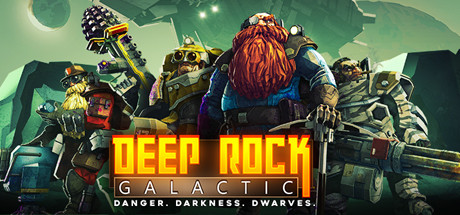
Deep Rock Galactic is a 1-4 player co-op FPS featuring badass space Dwarves, 100% destructible environments, procedurally-generated caves, and endless hordes of alien monsters.Deep Rock Galactic SYSTEM REQUIREMENTS
- minimum configuration:
- Requires a 64-bit processor and operating system
- OS *:Windows 7 64 Bit
- Processor:Intel i5, 3rd gen (or equivalent)
- Memory:6 GB RAM
- Graphics:NVIDIA GeForce GTX 660 or AMD Radeon HD 7870
- DirectX:Version 11
- Network:Broadband Internet connection
- Storage:3 GB available space
- Recommended Configurations:
- Requires a 64-bit processor and operating system
- OS:Windows 10 64 Bit
- Processor:Intel i5, 7th gen (or equivalent)
- Memory:8 GB RAM
- Graphics:NVIDIA 970 / AMD Radeon 290
- DirectX:Version 11
- Network:Broadband Internet connection
- Storage:3 GB available space
Deep Rock Galactic trainer Standard mode (Support 27 trainer, not support network mode)
Support Platform:steam,uwp
-
Unlimited HealthF1
-
Unbreakable ShieldF2
-
Unlimited FlaresF3
-
Super SpeedF4
-
Instant Drilldozer RefuelF5
-
No Drilldozer DamageF6
-
Instant Ability CooldownF7
-
Unlimited Abilities CountF8
-
Unlimited JumpsF9
-
Unlimited ResourcesF10
-
Unlimited CreditsF11
-
Set ScripCtrl+Shift+F1 - Ctrl+F1 +
-
Add 10 ScripCtrl+F2
-
Mega Class XPCtrl+F3
-
Season XP MultiplierCtrl+Shift+F4 - Ctrl+F4 +
-
Add 5K Season ExpCtrl+F5
-
Unlimited Perk PointsCtrl+F6
-
Unlimited AmmoCtrl+F7
-
Unlimited GrenadesCtrl+F8
-
Unlimited GadgetCtrl+F9
-
No ReloadCtrl+F10
-
No RecoilCtrl+F11
-
No OverheatAlt+F1
-
One-Hit KillsAlt+F2
-
Fly ModeAlt+F3
-
Fly UpAlt+F5
-
Fly DownAlt+F6
①Deep Rock Galactic trainerInstructions for use
- 1.Download Deep Rock Galactic trainer
- 2.Activate Deep Rock Galactic Game
- 3.Activate Deep Rock Galactic trainer
②Deep Rock Galactic trainer Operation Steps
- 1.Close Windows Security Center
- 2.run Deep Rock Galactic Game
- 3.Deep Rock Galactic After running the game, click the start button
- 4.The function will take effect after successful activation
- 5.Hotkey control function switch can be used
More languages
label:
You may also enjoy these games